
In light of a recent feature by Zach Prez of Photography Web Marketing (see the post here, if you missed it), it was suggested I blog about how to add the Pinterest tab on Facebook.
Pinterest does not have the option, yet, to embed a tag from their app to Facebook. I've used the Static iFrame app with the "Pin" icon at this point. Click here to install the app on your Fan Page.

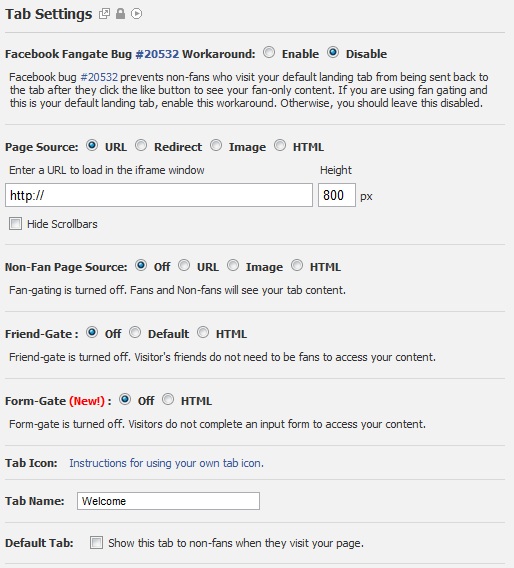
In the place of the URL, you can either put the URL for a single pinterest board, like http://pinterest.com/studiotrainer/photography-business-too/ or, to all of your boards in general, like: http://pinterest.com/studiotrainer/ it's your choice.
Rename the tab to something like "Pinterest" or "Pinteresting",etc and hit save. You're done, and your boards are now live on your business fan page.
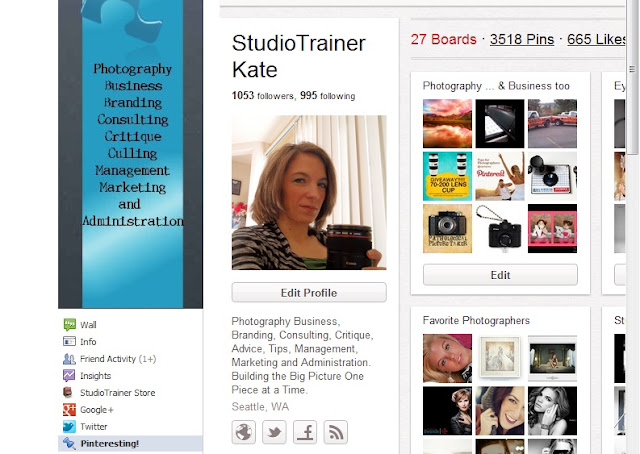
Keep in mind, you CANNOT edit the width, and your pinterest page is wide, so there will be scroll bars (your Facebook page can only handle up to 520px wide). It's not the prettiest thing out there, but it works. People will follow you from it, and it's a fun way to share your boards (it's increased my following by over 300 people since I've added it to my page)! Mine look like this on my business page:
I am always on the lookout for a width customizable host, so if you know of one, please let me know. I'd love to hear about it so that I may pass it on.

