Showing posts with label branding. Show all posts

3.04.2012

Timeline for Your Brand: Tips and Best Practices


By now, you know that Timeline has come to Facebook Brand Pages.
Some of us are embracing it, as a champion of change. 

No matter what, your page will automatically switch over to Timeline at the end of March 2012. 

Did you know that your attitude about change is one of the biggest indicators of your success and potential for future growth? That being said... knowing the most you can about Timeline can help you approach it with an open mind and see that it really can be the best thing for your business - default landing tabs, or not. 

I'll have a full list of resources and recommended reading and things to view at the end of the post. 
_____
Let's start at the top, with the Cover Image. Now, there are some ground rules that Facebook has put into place for this prime retail space, and they're important to take note of:


And while I've heard complaints about this and not understanding the rationale behind it, you have to understand, they want the Cover photo to be clean and professional and free of the spam feeling. It's basically like a city having building requirements for the appearance of a building, the cover is FB's "building appearance".  They've given us the "post pin" option to allow us to market to our visitors in place of marketing on our covers. We'll talk about this later.

The size for the Cover image is 851 x 315px. There are resolution problem being reported across the board, and it seems to be that way regardless of what people are trying. There are a few places offering Timeline templates: Florabella, Fototale Designs, Ashe Design, EW CoutureAlbumCafe, Schweppes ProfileApp, The Shoppe, MCP Actions, UkanduRed Boot Design and Paint the Moon


________
Now, don't forget to customize that awesome profile photo! Obviously, the big old banners we used to have are way too big, so we've moved down to a 180 x 180 size. 


Find something to represent your business that will not only be recognizable in the ticker and news feeds, but also that compliments your cover image really well. Be creative here. So far there are no guidelines for your profile photo. I'll keep you in the loop when I start to hear otherwise. 
________
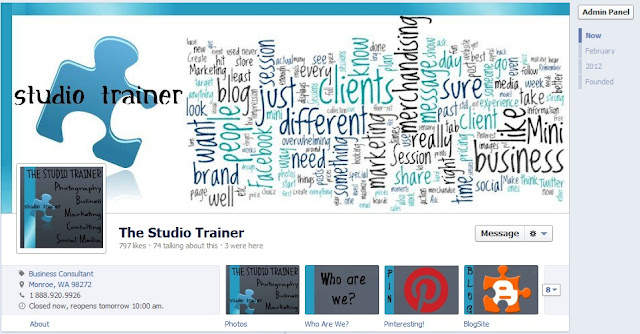

The next area you can customize is the app buttons and app order. When you first activate your Timeline on your business page, your apps will be in a random order. There are 4 "Featured" Apps, and you get to choose 3. Photos is a permanently featured app on your page (kind of cool for photographers!). 

The other 3 you choose to Feature are up to you. You can rotate these, so this isn't a life or death decision. However, these should be places you want your visitors to notice. Whether that's your Welcome App to explain your experience, your Store, your blog, your pinterest App, or your Portfolio Slideshow App, make sure they are right for your brand and your business. 

Now you'll also notice, there is a little "8" with a drop down arrow next to my Featured apps. Your fans can see a total of 12 apps on your page. You get to choose 10 of those (Photos and Likes are permanents), like this:
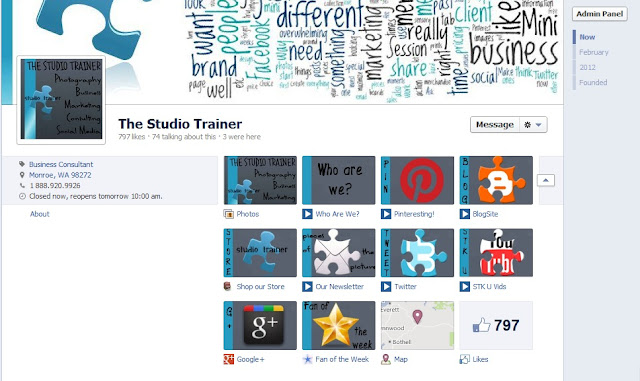

With all of the apps, you can put them in any order you choose. On the upper right hand corner of the app square, there is a pencil. When you click the pencil, you can choose to swap it's position with another app. Also on that pencil, you can "Edit Settings". That is where you can change the display name of the app and change the display picture, as I have done here. I designed the branded images for each of my apps and the dimensions are 111 x 74px. 

Some app hosts have moved over to the Timeline full width app designers, and I'm hosting most of mine (Who are We, Pinteresting, BlogSite, Our Newsletter, Twitter, & STK University Vids) at this point on ShortStack's Timeline width (810px). There are several versions of ShortStack, and there is more customization available at the $30 a month version (like the little blue arrow icons you see - you can change those at that level), but everything I've done right now is on the free level. All the custom app buttons can be done with any app on Facebook, it is not just with ShortStack apps. 

Here's the other fun thing that a lot of business owners don't know yet ... bury that "Likes". Mine is the last on my apps. There's a reason for that. Did you know ANYONE can click on that and see a small overview of your insights? You can go to your competitors and see who is talking about them and how they're doing and when they've gotten the best involvement on their page. It's like public marketing research available on our  pages. It will still be there, of course, and people will still be able to find it (there is no "hide"), but at least it won't be screaming in your prospective clients faces as a Featured App.


The biggest change is there is no default landing tab, but this isn't really a detriment. While you may hear about fan-gating as an option still being available, I have been testing it not only on my own page (see my Who Are We app, below), but on other pages as well. If you go to the app, you can still click on the Business Page name, and it will load the Timeline in full, so it's not really locking out your page information to those who haven't "Liked" you, regardless of settings. Some are recommending using a contest or incentive in place of the fan-gate to Incentivize your "Like-Gate" instead on your Welcome/Start Here apps. 


_________
Some of the next things you'll see on the page are things like Friends, Mentions, and Recent Posts.
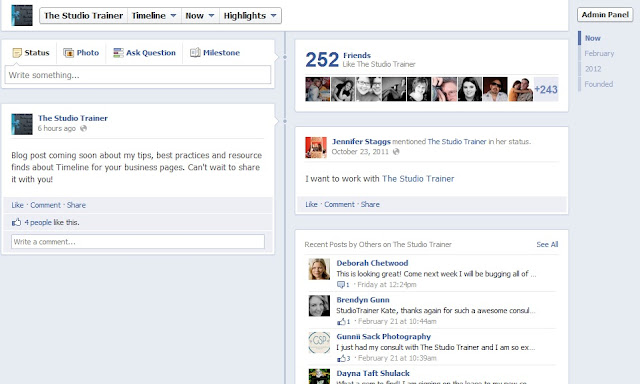


The "Friends" number will change depending on who is viewing the page. It will tell them how many of their friends like your page. The Mentions will have posts by their common friends about their page. It almost works as a recommendation for you, or a review. Then, there is the Recent Posts by others about your page. These things aren't movable, if you have them set up to show on your page when you edit your settings. 

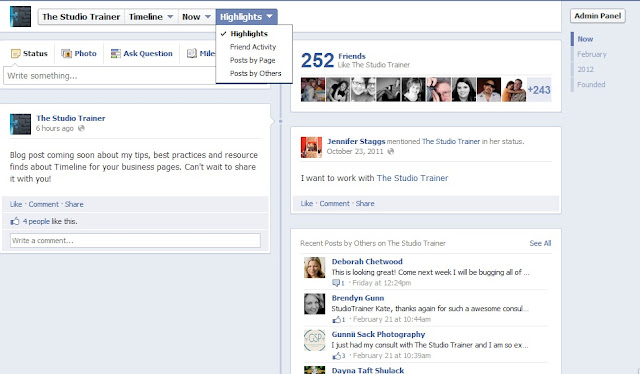
At the top, you'll notice there is a setting selected called "Highlights". Your page is automatically set to that when people visit. If you click the drop down, you can change to view Friend Activity, Posts by the Page, and Posts by Others. These options are available to all of your fans. 


_________
Now we'll move on to post options. I'm not going to go into depth here, as there's an awesome post by Sarah Lee Williams Photography that goes into great detail about it.

The first feature we'll talk about with posts is the ability to "Pin" a post. This is Facebook's answer to our advertising needs, as it allows us to have something stuck to the top of our Timeline for up to 7 days a time. 
While you can pin statuses or links, the most effective use of a pinned post would be a graphic or sales focused image. If you're having a Mini Session, a sale, looking for Reps or Mombassadors, want them to like your page, or any other call to action, this is your place to do it. 
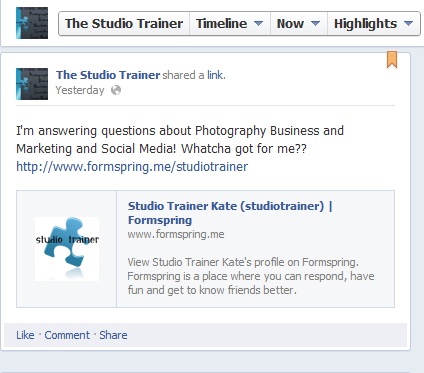

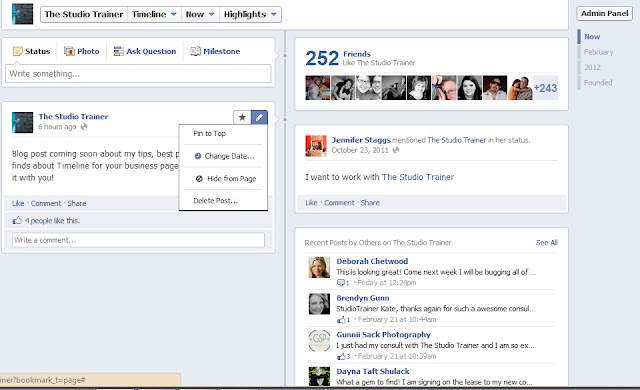
You can pin a post by clicking the pencil at the top right hand corner of the post and selecting "Pin to top". Voila! You're done! 

You can only pin a post one time, for those 7 days. If you want to pin something for more than 7 days, you'll have to create a whole new post or upload a new image, and pin it again as a new image or post. 


Another thing that Facebook has added in for us is the option to Highlight posts. The Highlight function allows us to spread a post across our entire Timeline. 
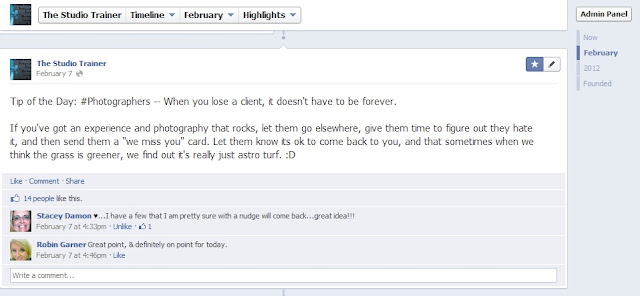


This one is easy to do - simply click the little star on the post and choose to highlight it. Right now, I'm using this one for things like blog posts, tips of the day, and things I want to make sure my fans see when they visit my page.
__________
The last thing I want to cover is adding Milestones. I know that a lot of people feel like they don't have the time to go back and do this, but I urge you, especially as a small business with a personal brand, take the few minutes to go back and add in your moments. Your clients will feel the connection. Add in things like your founding, your 1 year anniversary of business, your 100th client. You'll be so glad you did! (and if big-wigs like Coke feel it's important enough to do, you should, too!).
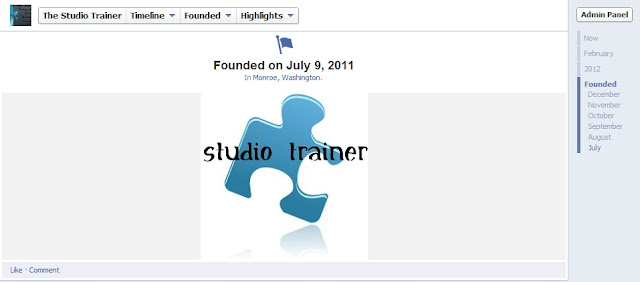


Go back to any date in your timeline, and add something. You can even change the date of your posts from that handy little pencil. Add a photo, and the story. Have fun with it. Every business has a story - let Timeline help tell yours!
______
I wanted to highlight some of the better customization I've seen of Timeline by photographers and those in our industry to date. I will continue to add to these as I see Rockin' designs come across my screen in the near future:


One of our readers that customized her page after reading our post:

______
Alright, I promised resources, so here they are:


Learn Facebook Pages (interactive course)
About Facebook Pages
Facebook Pages Help Center
Facebook Pages Guidelines and Rules
ShortStack Facebook Pages Webinar
Customize Posts on Timeline
Dimensions for Facebook Timeline Images
KissMetrics:Timeline Need to Know


Timeline Cover Templates
Florabella
Fototale Designs
Ashe Design
EW Couture
AlbumCafe
Red Boot Design
The Shoppe
Ukandu
MCP Actions
Schweppes ProfileApp
Paint the Moon

Great Series about Timeline for Photography Pages by the Milky Way:
Part 1
Part 2
Part 3
Part 4a


_______
As always, if you have comments or questions, I'm here to help! Feel free to post below, send me an email, or send me a question via formspring

12.07.2011

Branding Basics


There are a lot of things to think about when you're branding your business. To keep yourself organized, I recommend starting with a branding board. From there, you can place things into the branding binders and put things into action. 

Branding is ultimately the way that your business effects the senses of the public. It is your message, your personality, the vision, your experience, your feel, your smell, your "sound", the way the business "tastes" to your prospects and clients. It is the words, the emotions, the colors, the flow, the information, the layout, the vendors you work with, the clients you represent, and the life of your business.  

It is you, in business form - like your heartbeat, your dreams into a living being. It is what creates their memory and recall of your business, the connection and attachment that builds loyalty. It is how you're recognized. Your branding is your "special sauce".

Your images, your editing, the way you answer the phone, how your office looks, how you run your sales appointments, how you email clients, your packing and delivery, your mailers and promotions, the events you host, your URL, your writing style on your blog, your workflow,your prints and products, how many clients you take on, any special programs you run, even your pricing and package structure ... it is all a part of your branding. Your branding builds the expectation of the experience with you. 

Branding has to be authentic and realistic - so don't overpromise and under deliver. Hold yourself to the standard of your brand - every decision you make for your business will effect it.
Use magazines, pinterest, everything you can and cut out or print out things you love. Put them on the board under different headings. 

To start branding, choose:
  • Name
  • Colors
  • Graphics
  • Words
  • Images
  • Design (simple or detailed)
  • Smells
  • Experience
  • Business Model (high volume, low volume, boutique, etc)
  • Photographic Style and Editing Style
  • Fonts
  • Specific Target Market (age, spending style, where they shop, what they love, who they are)
  • Marketing avenues (twitter, fb, g+, blog, website offline - how often, and what)
  • Vendors that represent your brand well 


Things you need to brand:
  •  Logo
  • Tag Line
  • YouTube Url and Design
  • Twitter Url and design
  • G+ profile and page
  • Website Url and design
  •  Blog Url and design
  •  Facebook Page, welcome page, and tabs
  •  Promotional Pieces
  • Props, Backgrounds, Places your photograph and Sets
  •  Inquiry Script
  •  Booking Script
  • Pricing and Packages and presentation of prices
  • Events and Special Promotions
  • Office Space and Desktop
  •  Presentation and Ordering Process
  •  Product Line
  •  Email Marketing 
  •  General Advertising Piece
  •  Business Cards
  •  Rep or Referral Programs
  •  Checks and Credit Cards
  •  Policies
  •  Customer Retention Program
  •  Email Communications 
  •  Workflow process created
  • Packaging and enclosures/gifts
If you're ready to move to Branding Binders, click here

More info on a Word Bank is here.

What about Branding Yourself? 

10.06.2011

Personally Professional: Online

A couple of weeks ago, a photographer friend of mine contacted me and asked me to write up something about this very heated (and slightly controversial) topic. This will also be a series of posts (I've got a lot to say about this).

Now that our world is strongly social with its media base, there are lines that are blurred, crossed and created every day. Somewhere in the midst of all of this, we've forgotten about professionalism, respect, and common sense.

Don't think this applies to you? Keep reading. 

Every day, I see posts from small business owners. On their profiles, on their pages, in their twitter feed. I get to see everything from what they had for breakfast to the sessions they've photographed, to quotes that inspire them. And I also get to see when they're out drinking, what their religious beliefs are, if they have any prejudices (yes, I will call them out as such). I get to see their drama, their negative attitudes, and their posts about other businesses. Basically, I get to watch them harm the brand that they've worked so hard to build. 

Yes, there is something to be said about being authentic. I would hope that we are all authentic every day with every piece of our life. However, being authentic doesn't mean that you should post something or share something that isn't friendly to the public. You can be equally authentic with a filter.

What I'm saying is ... your profile may not be your business, but you are your business. You never know if your friends know people who may be your target market.

Are all of your clients exactly like you, with the same beliefs, the same sense of humor, the same prejudices? If so, your client list must be TINY - or you are disillusioned. Don't ever assume that those who view your business page cannot see your personal page, or your tweets, or anything you post on the web with your name attached to it (gotta love Google search). If you're putting it out there, it's fair game for ANYONE.

Your profile, your posts, anything you share is a part of your campaign. Much as a politician campaigns for votes into office, you're campaigning for likes that turn into clients. Politicians have to be very careful with what they say, where they're seen, what they do ... as a small business owner, you have that same responsibility to your business. You owe your business and your clients to put your best, most professional foot forward, personally. Your campaign for your business is a reflection of your clients and your brand (you are who you hang out with, after all).

Imagine this conversation: 

        Possible Prospect: "Hey, do you know any great photographers? I don't want someone cheap, I'm really looking for nice quality photographs. I want something for above the fireplace in our new house."

        Your Facebook Friend: "Oh, well I would recommend this awesome photographer, but she just posted about ________ on her profile, so I don't think you guys would work well together."

       Possible Prospect: "Was that that photographer on your friends list? Yeah, I looked at her work. I figured I'd ask you first since you know her. Too bad, her work is what I was looking for."

or ....

         Your Facebook Friend: "No, sorry." (as she thinks about how you just tweeted about something offensive and is embarrassed to recommend you)

Oh wow, right?

Think about it (and before you post) --

  • Has there been anything you posted lately that could be offensive? 
  • Anything that could bring negative light on you or your business?
  • Anything that could push prospects away? 
  • Is there anything that could be keeping you from growing your client base?
  • Would I be embarrassed if someone saw this post in a year?
  • Did it build up you or your business or your clients to post this?
  • Am I posting out of emotion?
  • Does my boss/grandma/the world need to know this?

Just because you CAN post it, doesn't mean you should. If you really have to write it out somewhere, create a private blog, or write it out by hand, and throw it away!

... Wait, what if I'm new to photography, and I hardly have any clients let alone fans. Does it really matter what I'm posting?

Oh my goodness, yes! The one thing about the online world is nothing ever goes away!

In 2 years, when business is picking up and prospects are contacting you, do you want them to see what you're posting? You should run your business now for the business you plan on having in 10 years. Being "new" or few in fans doesn't give you any less responsibility towards your client base - whether that client base is past, present or future.

Your posts online become your brand. They're the "living/breathing" parts of who you are in this digital world. Prospects can see you wherever you put yourself on the web, so unless you create an alias to post these things to, think twice before you post. If you're strongly opinionated, have any prejudices, or tend to be a realist/negative this would be where you want to work on your filter.

Just as a guide, things to avoid posting about would be:

  • Religion
  • Politics
  • Negativity or Judgement of Other Photographers 
  • Womens Rights
  • Sexuality
  • Sports (yes, sports - diehard fans are people you don't want to upset)
  • Alcohol/Drugs
  • Sex
  • Prejudices of ANY kind

UNLESS of course, the topic - and your stance on it - is a strong part of your brand.

I wish I could say this is uncommon. That people think of their brand and their clients and other people in general before they post. If that was the case, I wouldn't have been asked to write this post. I implore you, small business owner, be more conscientious, respectful, and personally professional in your social media.

-------------------------------

I want to know what you think about this. Have you seen it? What are your reactions when you see a business or business owner post something strongly opinionated, prejudiced or negative?

8.22.2011

A Social Brand


There are two things about social media that a lot of people don't realize --

1. You cannot rely on it as the "way to go" in and of itself. (it needs to be a part of a strong marketing strategy)

UNLESS ...

2. You have created a strongly social brand OFFLINE.

----------------

Think about the photogs we love because of the social feel of their brand -- (J* anyone??) ... they have built a social brand.

This means their clients have been "trained" to interact with them on a higher level because that is how their brand works. If we want "conversations" in our social media, then we need to inspire them with EVERY way we interact with our public.

Teach them that their input will receive real responses, that their voices will not only be heard but listened to. Create a link between every piece of your marketing, build response from your videos to your pages, your emails to your pages, your print pieces to your pages.

Call them to action to interact, to share, to respond.  This means more than just putting your URL on a piece or linking a post to your page. Give them a REAL reason to come check it out. You need feedback on a new product or there's a new program you're launching. You NEED their input, because they're your trusted clientele and prospects, and no one knows better than they do about what they like ;)

It takes a high amount of energy to be a social brand. It can't be sporadic. It has to be consistent, authentic, informational, funny, different, inspiring. It takes the most energy to create this part of your brand, but if it's real, it will be the easiest to maintain once it's in place. 

8.15.2011

Brand Binders

Whether you run one segment or five, a Brand Binder is one of the most important things you can put together for your business. In previous posts I've given an overview of my binders, but now I'd like to go into more detail.

Each binder should be all about the brand (seniors, kids, families, weddings - one per binder). I like to use the View Binders, because I like to put the logo, tag line and value statement on the front.

Your office and operations should look and feel as professional as your photography, the experience, your sales and your finished orders. The more you "feel" your own brand and make it a part of the entire adventure (even for yourself and your staff) the more you will be able to successfully and authentically communicate it and make choices with it in mind.

To start you'll need:
Binder
Monthly Tabs
Pocket Folios
          1. Color Swatches and Word Bank Pocket
          2. Past Marketing Pieces Pocket
          3. Inspiring Marketing Pieces (from other photogs, etc) Pocket
          4. Tear Sheets Pocket (Images that appeal you, marketing from stores from your demo, etc)
   
Setting up your pockets:
1. Exact color swatches from your brand colors. You will use these as reference if you ever feel a color is just a little off; The Main Word Bank you created for the brand.
2. Any previous marketing pieces/promos from this target, to date. Go as far back as you have on file.
3. Any marketing pieces from other photogs you've saved, kept, etc. Print it out if it's online, and put it in this folder.
4. Images that appeal to you or inspire you. Ideas about new poses, marketing from stores that target your demographic.

Working with the Months:
In each monthly divider, you'll keep the promos from this year. Let's say you're starting your new month divider:

First, put in your month overview calendar. Make sure it includes your workflow. When will a promo go out, when do you need photos for the next promo, when can you expect the highest call volume, when will you have production time, etc.

Next, the inquiry log for this month. Use this. It'll help you keep track of how effective your promo is.

Then, your benchmark sheet.  This is a sheet with your projections and estimates, and where you can place actuals. (Sample on our Documents Page) You'll need one for every promo you are running that month.

Next, your ads, emails, contact with clients, brainstorming sheets, designs, word banks for the promotion. You will want to take notes on all of these things, during the promotion and after. Make sure everything has dates on it for when the ad started.

Make notes when you check your effectiveness, how many people viewed or clicked through within 24 hours, within 48, etc. How many phone calls, etc. Be as detailed as possible.

What Now?
You can use the first few pockets to help build promotions and marketing pieces. They should be your go-to reference for keeping all of your communication and ideas brand right.

As every month closes, take a look back over the notes you made, what worked, what didn't. Make note of ideas you had that you want to work on again, what words prompted the most action.

Make sure to fill in your actuals on your benchmark sheet. Save a few actual photos from that months sessions (prints, in an envelope), and put it at the front of the month, with the benchmark sheet. Leave it in the binder, but use a binder clip to "close" that month.

This can help you make real time adjustments to marketing and wording for future promotions and ideas. The more detail you have, the more effective your changes will be.

Overall, the binder can help you keep tabs on marketing when you just really don't have the time or the staff to hold the position full time ... and if you do have staff, it can make sure that everything feels and sounds the same, even with so many people involved in the process.